Working with JSON data in Python
Learn to read, write and parse JSON easily in Python

What is JSON?
JSON stands for Javascript Object Notation. It is a format for structuring data.
It is one of the most popular formats to be used for exchanging information between servers and browsers.
Below is an example of JSON.
{
  "name": "Lenin",
  "age": 30,
  "twitter": "@pylenin",
  "website": "www.100daysofdata.com"
}
It looks familiar to Python dictionaries. Data is represented as key-value pairs, where the key and value are separated by a colon :.
However, there is a fundamental difference between JSON and a dictionary. Dictionary is a data type whereas JSON is a data format.
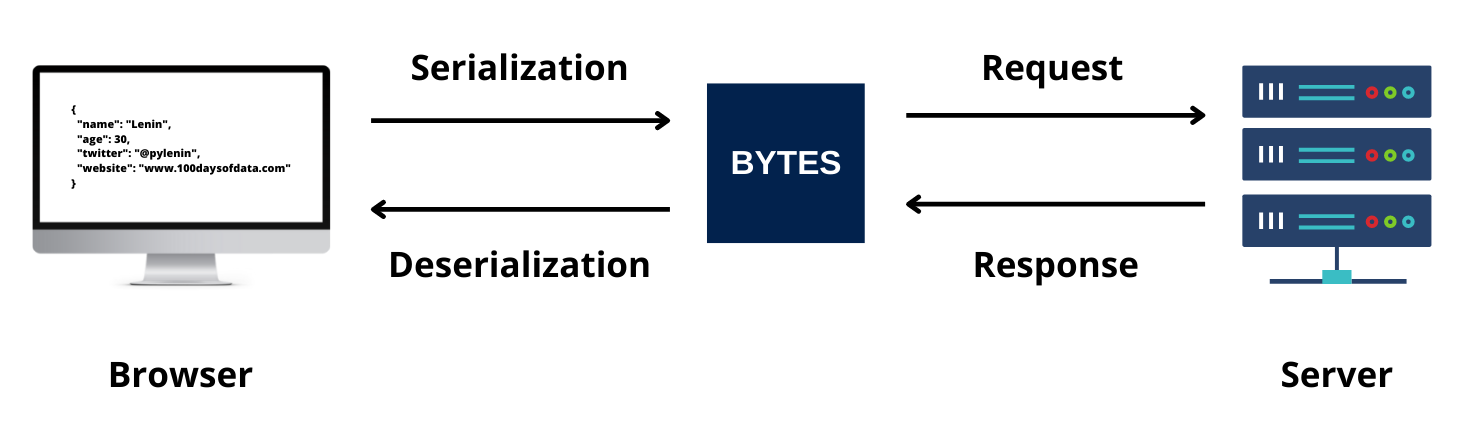
If you want to send the dictionary data over a series of network connection as an HTTP request(see image above), it needs to be converted into series of bytes. This is called Serialization. It helps save the state of the data type to be recreated when needed.
Similarly, if you convert the series of bytes you get as response from the server into a readable format, it is called Deserialization.
JSON is a set of rules used to convert such data types into series of bytes and vice-versa.
Python has a module called json that helps you analyze JSON data.
What is JSON serialization?
As explained above, Serialization is the process of encoding naive data types to JSON format.
In Python, different data types convert to different object types when converted to JSON.
| Python object | JSON equivalent |
| dict | object |
| list, tuple | array |
| str | string |
| int, float | number |
| True | true |
| False | false |
| None | null |
The json module in Python has two methods for serializing Python objects into JSON format.
json.dump()- writes Python data type to a file-like object in JSON format.json.dumps()- writes Python data to a string in JSON format.
Writing JSON to a file with json.dump()
To write JSON to a file, you can use json.dump() method. You have to pass in two arguments to the method - the data you want to serialize and the name of the file you are writing into.
Example 1
import json

data = {
  "name": "Lenin Mishra",
  "age": 30,
  "hobby": ["Biking", "Blogging", "Cooking"],
  "websites": [
    {
    "url": "https://www.pylenin.com",
    "Total blogs": "88",
    "description": "Everything about Python"
    },
    {
    "url": "https://www.100daysofdata.com",
    "Total blogs": "3",
    "description": "Everything about Data"
    }]
}

with open('details.json', 'w') as file:
  json.dump(data, file)
The above code will transform the dictionary object into a JSON string and write it to a file named details.json.
If details.json doesn't exist, the above code will create a new file with the same name. To learn more about file operations in Python, check out this article.
Writing Python object to a JSON string with json.dumps()
To convert the same dictionary to just a string representation of JSON, you can use json.dumps() method. Since you are writing to a string in memory, you just have to pass in the python object as an argument.
Example 2
import json

data = {
  "name": "Lenin Mishra",
  "age": 30,
  "hobby": ["Biking", "Blogging", "Cooking"],
  "websites": [
    {
    "url": "https://www.pylenin.com",
    "Total blogs": "88",
    "description": "Everything about Python"
    },
    {
    "url": "https://www.100daysofdata.com",
    "Total blogs": "3",
    "description": "Everything about Data"
    }]
}

data_string_json = json.dumps(data)
print(type(data_string_json))
print(data_string_json)
Output
<class 'str'>
{"name": "Lenin Mishra", "age": 30, "hobby": ["Biking", "Blogging", "Cooking"], "websites": [{"url": "https://www.pylenin.com", "Total blogs": "88", "description": "Everything about Python"}, {"url": "https://www.100daysofdata.com", "Total blogs": "3", "description": "Everything about Data"}]}
How to pretty print JSON in Python?
When you printed out the JSON string in the above example, the output must have looked messy. There are few arguments you can use to make the JSON look prettier!
indent
The indent argument allows us to either print the JSON string or the file to which JSON is outputted, in a more readable manner.
Example 3
import json

data = {
  "name": "Lenin Mishra",
  "age": 30,
  "hobby": ["Biking", "Blogging", "Cooking"],
  "websites": [
    {
    "url": "https://www.pylenin.com",
    "Total blogs": "88",
    "description": "Everything about Python"
    },
    {
    "url": "https://www.100daysofdata.com",
    "Total blogs": "3",
    "description": "Everything about Data"
    }]
}

data_string_json = json.dumps(data, indent=4)
print(data_string_json)
Output
{
    "name": "Lenin Mishra",
    "age": 30,
    "hobby": [
        "Biking",
        "Blogging",
        "Cooking"
    ],
    "websites": [
        {
            "url": "https://www.pylenin.com",
            "Total blogs": "88",
            "description": "Everything about Python"
        },
        {
            "url": "https://www.100daysofdata.com",
            "Total blogs": "3",
            "description": "Everything about Data"
        }
    ]
}
You can pass in different values for the indent argument.
- If indent is a non-negative integer or string, then JSON array elements and object members will be pretty-printed with that indent level.
sort_keys
If set to True, the sort_keys argument sorts the output JSON according to its keys.
Example 4
import json

data = {
  "name": "Lenin Mishra",
  "2022":"hello",
  "age": 30,
  "hobby": ["Biking", "Blogging", "Cooking"],
  "websites": [
    {
    "url": "https://www.pylenin.com",
    "Total blogs": "88",
    "description": "Everything about Python"
    },
    {
    "url": "https://www.100daysofdata.com",
    "Total blogs": "3",
    "description": "Everything about Data"
    }]
}

data_string_json = json.dumps(data, indent=4, sort_keys=True)
print(data_string_json)
Output
{
    "age": 30,
    "hobby": [
        "Biking",
        "Blogging",
        "Cooking"
    ],
    "name": "Lenin Mishra",
    "websites": [
        {
            "Total blogs": "88",
            "description": "Everything about Python",
            "url": "https://www.pylenin.com"
        },
        {
            "Total blogs": "3",
            "description": "Everything about Data",
            "url": "https://www.100daysofdata.com"
        }
    ]
}
As you can see, the keys have been sorted in alphabetical order.
Difference between json.dump() and json.dumps()
If you want to dump the JSON into a file, then you should use json.dump(). If you only need it as a string, then use json.dumps().
Tip to remember - If the method ends with an s, it converts to string.
What is JSON deserialization?
JSON deserialization is the process of decoding JSON data into a native data type in Python. Unless the data is something very simple, these methods will most likely return a Python dictionary or list containing the deserialized data.
The json module has two methods for deserializing JSON.
json.load()- loads JSON data from a file-like object.json.loads()- loads JSON data from a string containing JSON-encoded data.
Parsing a JSON string in Python using json.loads()
To parse JSON string and convert it to a Python dictionary, use the json.loads() method.
Example 1
import json

data = '{"name": "Lenin", "website": "100daysofdata.com", "age":30}'

json_dict = json.loads(data)
print(type(json_dict))
print(json_dict)
Output
<class 'dict'>
{'name': 'Lenin', 'website': '100daysofdata.com', 'age': 30}
If the data being deserialized is not a valid JSON document, a JSONDecodeError will be raised.
Parsing a JSON file in Python using json.load()
You can use json.load() method to read a file containing JSON object.
Example 2
import json

file_name = 'details.json'

with open(file_name, 'r') as f:
  data = json.load(f)

print(type(data))
Output
<class 'dict'>
Difference between json.load() and json.loads()
As mentioned earlier, s stands for string.
The json. load() is used to convert a JSON file into a dictionary whereas, json. loads() is used to convert a JSON String into the Python dictionary.
How to unpack JSON data in Python?
Deserialization helps to decode JSON values in Python. Once JSON is deserialized and converted to a dictionary, you can easily go through the keys and values of the dictionary using dict.items() and extract the necessary data.
Example 3
import json

file_name = 'details.json'

with open(file_name, 'r') as f:
  data = json.load(f)

for key, value in data.items():
  print(key, value)
Output
name Lenin Mishra
age 30
hobby ['Biking', 'Blogging', 'Cooking']
websites [{'url': 'https://www.pylenin.com', 'Total blogs': '88', 'description': 'Everything about Python'}, {'url': 'https://www.100daysofdata.com', 'Total blogs': '3', 'description': 'Everything about Data'}]